
 Try Luffy.so, your AI coworker powered by Harbor
One workspace your agents share — with tools, credentials, code, state, jobs, and traces wired in. Less tool ping-pong. More work that sticks.

Codemode on steroids.
hrbr exec runs typed TypeScript with your tools, credentials, storage, jobs, and traces already wired in.// hrbr exec — call a public Linear plugin tool from Harbor.
// Credentials never leave the workspace; every call is traced.
const issues = await linear_mcp.search_issues({
query: 'is:open assignee:me',
per_page: 5,
})
await hrbr.storage.put(
'daily-triage/' + new Date().toISOString().slice(0, 10) + '.json',
JSON.stringify(issues),
{ content_type: 'application/json' }
)
return { count: issues.length, first: issues[0]?.title ?? null }
Everything your agents need — in one workspace.
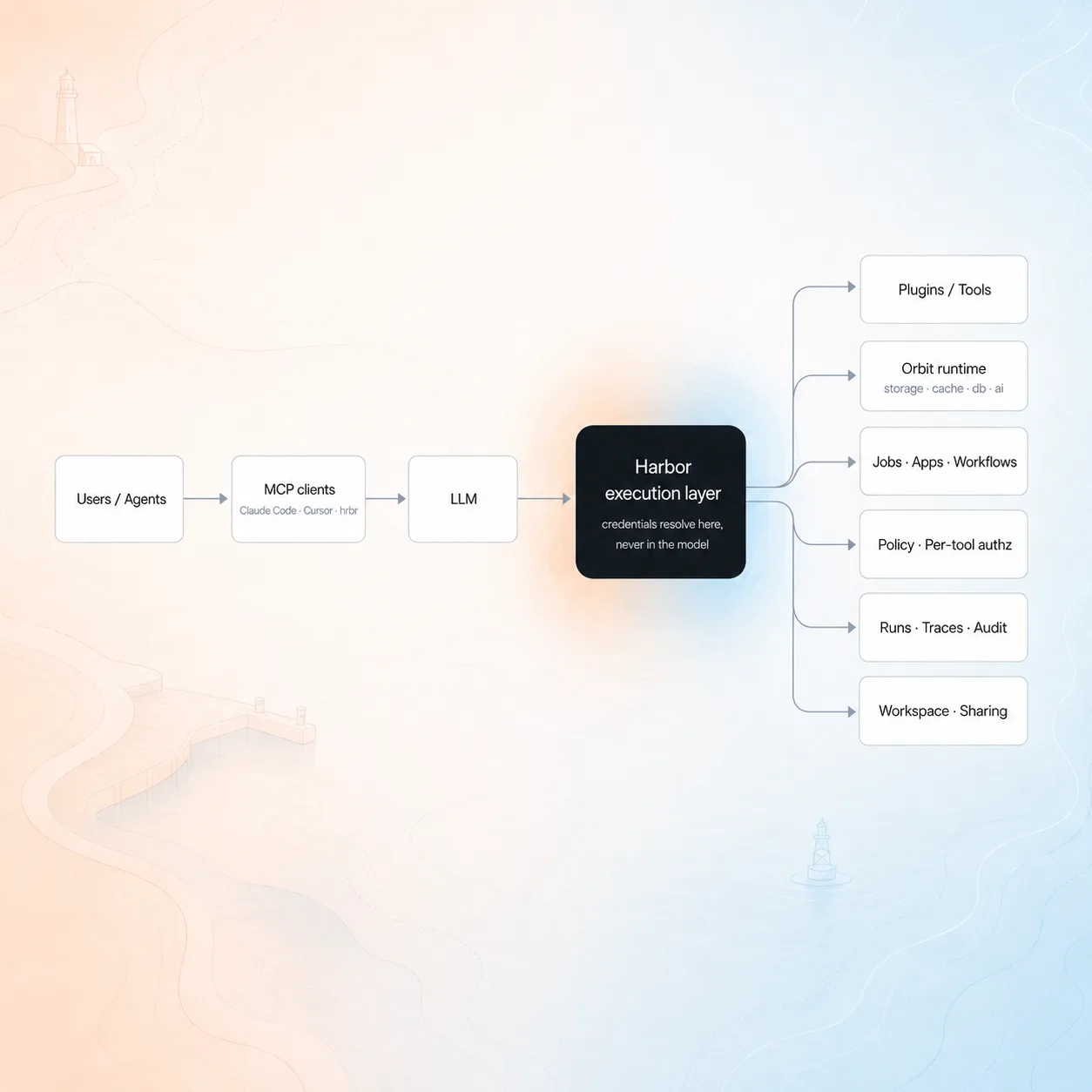

Efficient, secure execution.
const issue = await sentry.getIssue({ id: input.issueId })
const owner = await github.searchCode({
  query: issue.culprit,
  repo: input.repo,
})
const ticket = await linear.createIssue({
  team: input.team,
  title: issue.title,
  description: `Suspect: ${owner[0]?.path}`
})
await slack.postMessage({
  channel: '#incidents',
  text: `Triage ready: ${ticket.url}`
})
return { ticket: ticket.url, owner: owner[0]?.path } →
→ →
→ →
→











Connect agents to plugins
Wire agents to the workspace tools you actually use — credentials never leave Harbor.
Skills repository
Manage agent skills from a dashboard, not on scattered folders and files.
Reusable functions
Stop re-generating brittle scripts. Capture proven workflows as reusable functions.
Trace every step
One source of truth for every agent run and tool call. Audit any decision after the fact.
Shared team surface
Share plugins and skills across the team with a full audit trail of usage.
A security posture you can audit — not just trust.
Every control below is shipped today and verifiable in the Harbor codebase.
Identity & auth
- OAuth 2.1 + PKCE for inbound MCP clients (mcp.tryharbor.ai)
Execution isolation
- Per-tool grants for outbound MCP server calls
- Encrypted secret storage (Cloudflare Secrets Store)
Audit & data
- Workspace-scoped audit log
- PII scrubbing
Free until your agents earn their keep.
Start free. Pay only when your agents run at scale.
Team / Individual
- Personal and shared workspaces
- Public and private plugins, private MCP servers
- hrbr CLI and cli-mcp stdio adapter
- Per-tool authorization
- Full run tracing with span-level history
- Orbit runtime: storage, cache, db, ai, jobs, apps

Enterprise
Custom contract. Contact sales.
- Enterprise SSO (OAuth 2.1 + PKCE)
- Custom plugin registry scoped to your org
- Audit log access and per-tool policy governance
- Private compute and VPC isolation
- Budgeting, quotas, and usage exports
Frequently asked questions.
The ones every team raises in their first Harbor scoping call.
Where does my code actually run, and what touches my credentials?
Each `hrbr exec` submits code to an isolated, workspace-scoped runtime. Raw provider tokens never enter the model context, the code, or the trace — credentials resolve at tool-call time and dispatch on the workspace’s behalf.
Can I see what the agent actually did, step by step?
Every run writes a row plus a span tree: workspace, agent, plugin, tool, latency, errors, artifacts. Replay the run, inspect each tool call, see exactly what the agent reached for — same shape whether one-shot exec or a durable workflow.
What is an execution layer?
Harbor’s server-side runtime that turns submitted code plus workspace context into an audited run. Tools, credentials, state, and traces live in the layer — not in the agent — so swapping harnesses (Claude Code, Cursor, your own MCP client) keeps the same workspace, audit shape, and tool surface.
Can I pin data to a region or run Harbor on my own infra?
EU data residency is available today on request — contact support and your workspace is routed and stored in EU regions. Execution, data capture, credential storage, OAuth, and API warm clients all run on regional Cloudflare edge.
How are my secrets encrypted at rest?
Workspace OAuth tokens, API keys, and plugin credentials encrypt with AES-256-GCM before they hit D1. The key derives from a Cloudflare Workers deployment secret via PBKDF2-SHA-256 (100k iterations) into a non-extractable CryptoKey. Every credential row gets a fresh 12-byte IV; decryption only happens inside the execution isolate.
Can the agent or the model ever see a raw token?
No. Credentials live behind the V8 isolate boundary that runs your code — never serialized into the agent context, the tool response, the error message, or the span tree. Tool errors and span payloads pass through redactors that strip Bearer/Bot tokens, OAuth params, and JSON token fields before anything is written.
How do credential rotation and OAuth refresh work?
OAuth refreshes rotate the refresh token on every exchange and keep the previous token for one race-window lookback. Plugin credentials can be replaced in place — a new value re-encrypts and invalidates the cache. Disconnect deletes the encrypted credential and audits the action.